| ILC Breakout Rooms | MBEB Breakout Rooms |
|---|---|
| ILC 216 | MBEB 1105 |
| ILC 218 | MBEB 1108 |
| ILC 220 | MBEB 1009 |
| ILC 222 | MBEB 1111 |
| ILC 305 | MBEB 1122B |
| ILC 405 | MBEB 1122C |
| MBEB 1203 | |
| MBEB 1204 | |
| MBEB 1205 | |
| MBEB 1206 | |
| MBEB 2011 | |
| MBEB 3011 | |
| MBEB 3015 | |
| MBEB 3017 | |
| MBEB 3019 | |
| MBEB 3023 | |
| MBEB 3025 | |
| MBEB 3027 | |
| MBEB 3200 | |
| MBEB 4004 | |
| MBEB 4006 | |
| MBEB 4012 | |
| MBEB 4014 | |
| MBEB 4016 |
How to reserve a room
Use touch panels to make a room reservation.
If the room is available, the touch panel will show a green background with the text “Available” displayed with green backlit buttons:
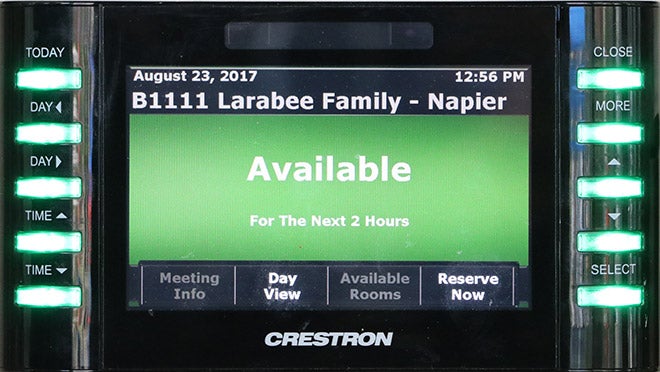
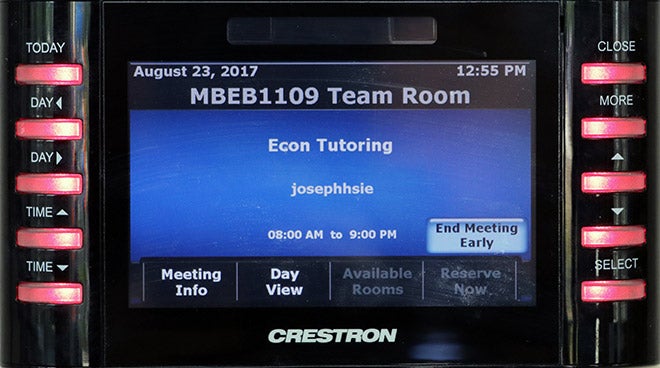
If the room is reserved, the background will be blue with red buttons, and the name of the reservation will be displayed.
Create a current reservation
To create a reservation for the current time, touch the “Reserve Now” button on the screen. There are two reservation options:
- 30 minutes
- 60 minutes
Create a future reservation
Please note that the Help Desk is unable to schedule breakout rooms in advance for you.
To create a reservation for a future time, select the Day View button, or select the Today physical button.
Navigate to what day is displayed by using the two Day physical buttons, and change the time using the two physical Time buttons on the panel.
To create a reservation from the Schedule View, select a time slot by touching the screen or moving the cursor to a time slot using the physical “up” and “down” arrow buttons, then click Select.
This will bring up the Add Appointment view which allows you to edit the subject of the reservation by touching the Edit button:
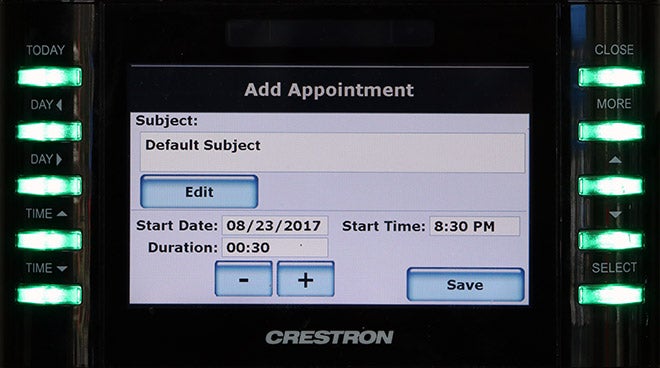
You can also adjust the duration of the meeting by using the – and + buttons on the screen.
Select Save to complete the reservation.
Need assistance?
For more information, contact the Help Desk at (208) 426-4357, helpdesk@boisestate.edu, chat, or Help Desk Self Service.